Free macro calculator

Macro Calculator: Calculate Your Daily Macros

Calculate calories and daily macro targets for protein, carbs and fat, or enter a calorie target you already use.

Start with
Units
Sex used for the calorie calculation

Choose the option that best matches your usual week, including work, walking and regular exercise. Do not add those workout calories again after the calculation.

This calculator provides an estimate for adults and uses transparent goal presets. Individual calorie and macro needs can differ, especially during pregnancy, breastfeeding, medical treatment or high-level athletic training. It is not medical advice.

What should my macros be?

What your daily macros should be depends on your calorie target, goal, training and food preferences. There is no universal “best” macro ratio. A useful starting point sets the calories first, then chooses a macro split that fits the goal.

This page can also work as a calorie and macro calculator in one. Calculate a calorie target from your details, or enter a target you already know and go straight to the macro calculation.

What are macros?

Macros, short for macronutrients, are the three nutrients that make up most of the calories in food: protein, carbohydrates and fat. The calculator turns your daily calories into a gram target for each one.

Protein
4 Cal/g
Provides amino acids for tissue repair and maintenance and supports muscle retention during dieting and resistance training.
Carbs
4 Cal/g
Provide energy for daily activity and training, with needs often increasing as activity rises.
Fat
9 Cal/g
Provides concentrated energy and supports normal cell function and hormone production.

How the macro calculator works

The calculator separates two questions that are often mixed together: how many calories to eat, and how to split those calories between protein, carbs and fat.

1. Set calories

If you choose “Calculate my calories,” the calculator uses the Mifflin-St Jeor equation to calculate BMR, applies your activity factor and then adjusts the resulting calorie target for your selected goal. If you already know your daily calorie target, you can enter it directly.

2. Apply the macro split

The calculator uses a transparent starting split for weight loss, maintenance, muscle gain or body recomposition. These percentages are calculator presets, not a claim that one exact ratio is ideal for everyone.

3. Convert to grams

The calculator converts the selected macro percentages into practical daily targets for protein, carbs and fat in grams.

Formula source for the calorie calculation: original Mifflin-St Jeor study.

How to calculate macros

If you are asking “How do I determine my macros?”, start with a calorie target, assign a share of those calories to protein, carbs and fat, then convert each share to grams. Protein and carbs provide 4 calories per gram, while fat provides 9. Here is the full calculation for a 2,000-calorie target using a 30% protein, 40% carb and 30% fat split.

Worked example: 2,000 calories

  1. Protein: 30% of 2,000 = 600 calories. Divide by 4 = 150 g protein.
  2. Carbs: 40% of 2,000 = 800 calories. Divide by 4 = 200 g carbs.
  3. Fat: 30% of 2,000 = 600 calories. Divide by 9 = about 67 g fat.

If you calculate calories from macros after rounding, the total may be a few calories above or below the original target. In this example, 150 g protein, 200 g carbs and 67 g fat add up to about 2,003 calories. That difference is just rounding.

Practical example: those daily totals could be spread across foods such as yogurt and oats, chicken and rice, fruit, and a dinner with fish or another protein source, potatoes and vegetables. The exact foods and the split between meals can vary. The daily total is what the calculator is designed to help you track.

If you already know your daily calorie target, choose “Use my calorie target” at the top of the page. In that mode, the page works as a macro calculator from calories and lets you calculate macros from calories directly, with the result shown as grams of protein, carbs and fat. If you still need a calorie target, use the Calorie Calculator.

Macro calculator for weight loss and fat loss

For weight loss, the calorie deficit sets the direction. The macro split decides how that calorie target is divided between protein, carbs and fat.

If you are wondering how to calculate macros for weight loss, the weight-loss / cutting preset makes the assumptions visible: in calculation mode it starts at about 15% below estimated maintenance and uses a 30% protein, 40% carb and 30% fat split. It is a transparent default you can review rather than a claim that one ratio is perfect for fat loss.

A macro calculator for fat loss cannot guarantee a specific rate of loss. Your real maintenance calories may differ from the estimate, and scale weight can move for reasons unrelated to body fat. If you use this as a cutting macro calculator, the same principle applies: set the calorie target first, then use the macro split as the working distribution. Compare your intake and weight trend over several weeks before making small adjustments.

If you want to choose a weekly weight-loss rate and calculate the underlying calorie deficit directly, use the Macroful Calorie Deficit Calculator.

Macro calculator for muscle gain

For muscle gain, the calorie surplus sets the overall target. The preset then gives carbohydrates more room while still allocating calories to protein and fat.

The muscle gain preset starts at about 10% above estimated maintenance and uses 25% protein, 50% carbs and 25% fat. When your plan includes a deliberate calorie surplus, the result also covers the intent behind a bulking macro calculator. Muscle gain is not limited to bulking, so treat the split as an adjustable preset rather than a requirement to hit every gram exactly.

More calories do not automatically mean more muscle. Resistance training, recovery, time and a sustainable rate of weight gain all matter. If your body weight is changing much faster or slower than intended, review the calorie target first before chasing a different macro percentage.

Macro calculator for women: what actually changes?

A female macro calculator should not assume that every woman needs a separate protein, carb and fat ratio. The meaningful difference starts in the calorie calculation.

In “Calculate my calories” mode, the Female or Male selection changes one constant in the Mifflin-St Jeor equation. The resulting calorie target and selected goal then determine the macro calculation. Two women with different body sizes, activity levels and goals can therefore receive very different calorie and macro targets.

Pregnancy, breastfeeding, medical conditions and some stages of athletic training can change nutrition needs in ways this calculator is not designed to personalize. In those situations, use individual guidance from an appropriately qualified professional.

Macro percentages vs. grams: what the split means

A percentage only becomes useful once it is tied to a calorie target. The same macro ratio can produce very different gram targets at different calorie levels.

Weight loss / cuttingBelow estimated maintenance30% protein · 40% carbs · 30% fat
Maintain weightAround estimated maintenance25% protein · 45% carbs · 30% fat
Muscle gainAbove estimated maintenance25% protein · 50% carbs · 25% fat
Body recompositionAround estimated maintenance30% protein · 40% carbs · 30% fat

Terms such as macro split, macro ratio and macro percentage all describe how calories are divided between protein, carbs and fat. Whether a tool is described as a macro split calculator, macro ratio calculator or macro percentage calculator, the basic conversion is the same: a percentage of calories becomes grams per day. At 1,600 calories, 30% protein equals 120 g. At 2,600 calories, the same 30% equals 195 g. That is why the result card shows grams alongside percentages.

Maintenance macros and body recomposition

Maintenance and body recomposition both stay close to estimated maintenance, but they use different starting macro splits.

A maintenance macro calculator keeps calories around estimated daily energy needs. In this calculator, the maintenance preset uses 25% protein, 45% carbs and 30% fat. Body recomposition also starts around maintenance, but the preset shifts to 30% protein, 40% carbs and 30% fat. Recomposition is usually slower and less predictable than simply changing scale weight, so judge the plan by your training, measurements and longer-term trend rather than expecting the scale to tell the whole story.

How to use your daily macro targets in real life

A calculator result only becomes useful when you can compare it with what you actually eat. You do not need every meal to match the same ratio. The daily total is the more practical target.

  1. 1. Start with the daily totals. Use your calorie, protein, carb and fat targets as a daily reference rather than trying to make breakfast, lunch and dinner identical.
  2. 2. Log the foods you actually eat. Include portions, drinks, cooking fats, sauces and packaged-food serving sizes when they meaningfully affect the meal.
  3. 3. Look for patterns, not perfect numbers. A small difference of a few grams is usually less important than logging consistently and keeping the overall pattern close to your target.
  4. 4. Adjust when the trend gives you a reason. If your body-weight trend and goal consistently do not match, review the calorie target, activity estimate and logging accuracy before changing the macro split.
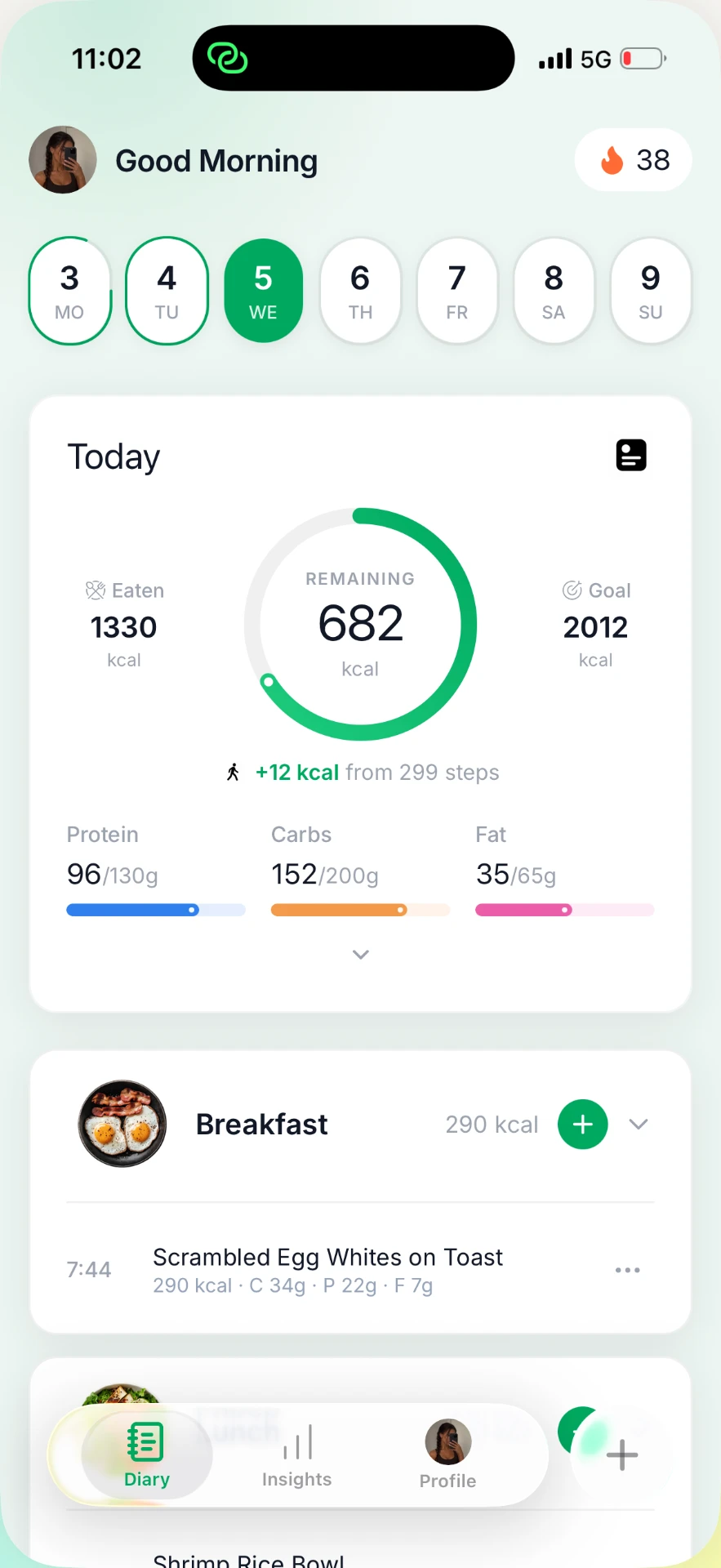
Macroful diary showing daily calories, protein, carbs and fat progress
Macroful app

Frequently asked questions about macros

How often should I recalculate my macros?

You do not need to recalculate them every day. Revisit your targets when your body weight, activity level, training routine or goal changes meaningfully, or when your longer-term progress no longer matches the plan. Small day-to-day changes usually do not require a new calculation.


How many macros do I need each day?

Your daily macro needs are expressed in grams of protein, carbs and fat. The exact amounts depend largely on your total calorie target and the macro distribution you choose. A higher or lower calorie target changes the number of grams you can eat each day, while different goals can shift how those calories are divided between protein, carbs and fat.

How do I calculate calories from macros?

Multiply protein grams by 4, carbohydrate grams by 4 and fat grams by 9, then add the three numbers. For example, 150 g protein, 200 g carbs and 67 g fat provide about 2,003 calories. The small difference from 2,000 is caused by rounding the gram targets.

Do I need to hit my macros exactly every day?

No. The targets are a daily reference, not a requirement to land on the exact gram every time. Small differences are normal. Consistent logging and a pattern that stays reasonably close to your calorie and macro targets are more useful than forcing every meal to fit perfectly.

Do women need a different macro ratio?

Not automatically. The calculator uses sex as one input when it calculates your calorie target, because the Mifflin-St Jeor equation uses different constants. It does not assume that every woman needs a special protein, carb or fat ratio. Goal, calories, training and personal preferences still matter.

Can I use the macro calculator if I already know my calories?

Yes. Choose “Use my calorie target,” enter your calories per day and select your goal. The calculator will split those calories into protein, carbs and fat and show the result in grams per day.

From target to daily tracking

You’ve got your numbers. Now make them count.

Macroful

Snap your meal. Watch your macros appear.

Download on the App Store